 ELHEXA Codex
Card Trading
Card Trading is the fixed-price floor of the Royal Exchange: list one of your adventurers for a set price, or browse other players’ listings and buy instantly. First tap wins — there is no bidding here.
Selling a Card
1
Open the adventurer you want to sell and tap Trade.
2
Set your price in Trading Credits — it must meet the rarity floor (see below).
3
Confirm. The card is locked while listed: it can’t go on quests, merge, transmute, or be locked.
4
When someone buys it, tap Collect to receive your credits (price minus fee).
Note
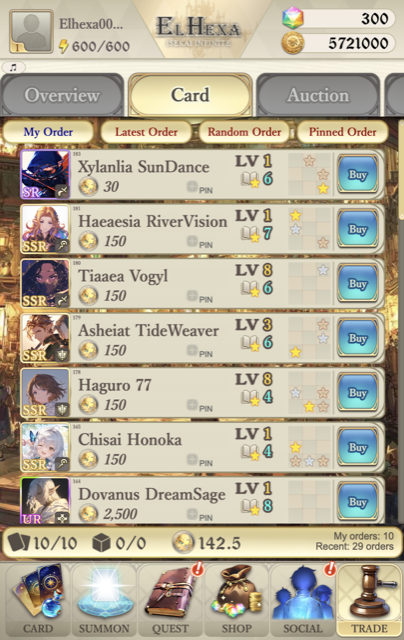
You can hold up to 10 active listings at once. Your count shows in the status bar (e.g. 10/10).
Minimum Price by Rarity
Every listing must be priced at or above a floor set by the card’s rarity:
| Rarity | Minimum Price |
|---|---|
| N | 1 |
| R | 2 |
| SR | 3 |
| SSR | 50 |
| SSR (Outlander) | 150 |
| UR | 750 |
Browsing & Buying
The Card tab has four views: My Order (your listings), Latest Order, Random Order, and Pinned Order (cards you’ve bookmarked with the PIN button). Each row shows the adventurer’s level, rarity, skills, and asking price.
1
Find a card under Latest, Random, or Pinned.
2
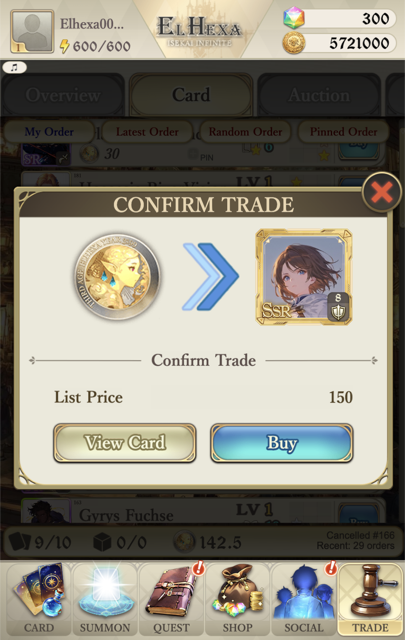
Tap Buy, then View Card to inspect its full stats and skills.
3
Confirm Buy — credits leave your balance and the card lands in your box immediately.
Note
Buyers pay exactly the list price — there is no buyer fee, and the card arrives right away.
Fees

A flat 5% fee applies to every sale, deducted from the seller’s proceeds. Buyers never pay a fee.
List at 1,000 → 5% fee = 50 → you collect 950.
Note
The fee is only taken when you tap Collect after a sale completes.