 ELHEXA Codex
Claim & Repeat
Once you have a working roster, the most tedious part of questing is collecting rewards and redeploying. ELHEXA gives you two shortcuts to make this nearly instant: Claim All and Repeat.
Claim All Rewards
When an institution has two or more completed quests waiting, a Claim All Rewards button appears at the top of the quest list. Tapping it claims every completed quest in that institution at once — you don’t need to open each quest individually.
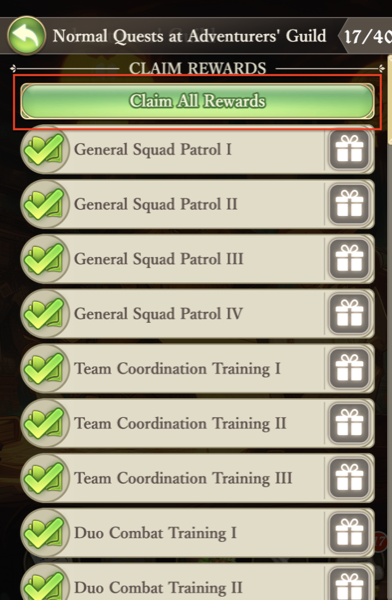
Each completed quest still pops its own reward window in sequence so you can see what you earned, but you only need a single tap to start the chain.
Repeat from the Reward Window
After a quest completes and the reward window appears, you get two buttons: Accept closes the window normally, while Repeat instantly redeploys the same adventurers you used last time on the same quest. No need to open the party screen or pick cards again.

Combined with Claim All, this turns a full institution’s worth of quests into a few taps: claim everything, then hit Repeat on each reward window as it pops up to redeploy the same parties.
What Cannot Be Repeated
A few quest types are excluded from Repeat by design:
Quests that can only be completed once — story quests, milestone quests, and similar — will not redeploy. They no longer exist as a runnable target after you finish them.
Some high-reward quests have a cooldown after completion. They cannot be repeated until the cooldown expires — the Repeat button will skip them.
You don’t need to manually skip ineligible quests. If a batch contains a mix of repeatable and non-repeatable quests, Repeat will redeploy everything it can and simply ignore the rest. There is no penalty — just hit Repeat and let the system sort it out.
For details on quest types, prerequisites, and cooldowns, see Quests.